La Élume Beauté · Chapter 6 of 7
A team tree you can zoom
 Jovanus Hartono2026
On this page
Some members of the store have a team, and the team page lists everyone on it in a table. Next to the table, "Team Hierarchy" opens a map of the same people: a nearly full-screen view with you at the top, as "YOU", and your team below, joined by thin lines. You can drag it around and zoom it with a mouse, a scroll wheel or two fingers. Down the left edge there's a label for each level of the tree, "Level 0", "Level 1" and so on, which stays pinned to the edge while the tree moves underneath it. I built the map because a table is a bad way to see who sits under whom.
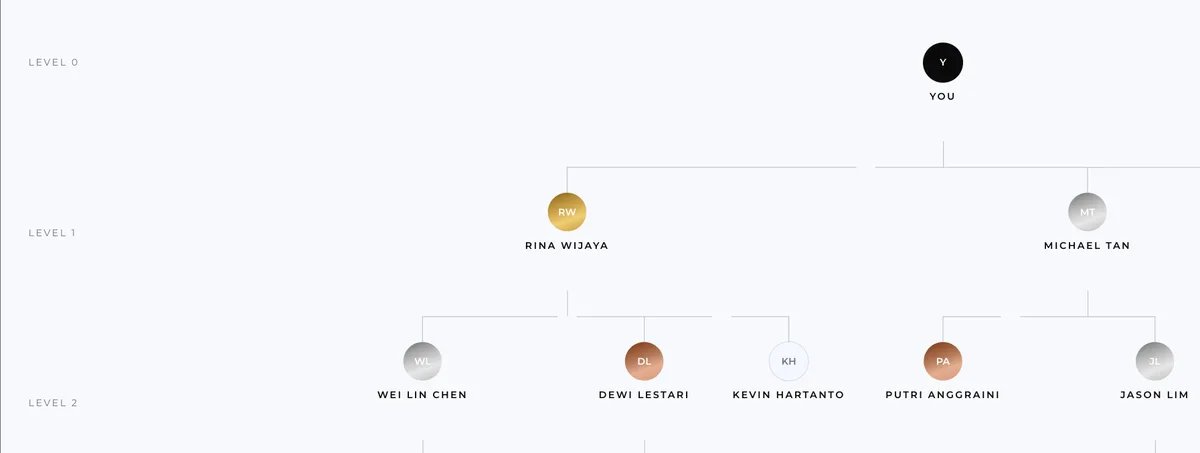
A tree made of flexbox
The tree is drawn with CSS alone: no graph library, no SVG, and nothing measured. It's flexbox all the way down. Each person is a column: their card, a short line down, then a row holding their children, each of which is a column too. The component draws itself for every child, so one component draws the whole tree, however deep it goes:
const TreeNode = ({ person }: { person: Person }) => (
  <div className="column">
    <Card person={person} />
    {person.children.length > 0 && (
      <>
        <div className="stem" />
        <div className="row">
          {person.children.map((child) => (
            <div className="column" key={child.id}>
              <div className="connector">
                <div className="line" />
                <div className="drop" />
              </div>
              <TreeNode person={child} />
            </div>
          ))}
        </div>
      </>
    )}
  </div>
);
The part that looks hard is the bracket that joins a parent to its children. The trick is that nobody draws the whole bracket. Each child draws its own piece of it, in a small box at the top of its column that's as wide as the column.
The first child draws from its centre to its right edge, the last from its left edge to its centre, and every child in between draws all the way across. Side by side, the pieces line up into a bracket. A short line down from the centre of each box reaches the card. Every line is a plain element one pixel thick. In CSS, the three cases are three rules:
.connector { position: relative; height: 32px; }
.line { position: absolute; top: 0; left: 0; right: 0; height: 1px; }
.column:first-child > .connector > .line { left: 50%; } /* centre to right edge */
.column:last-child > .connector > .line { right: 50%; } /* left edge to centre */
.drop { position: absolute; top: 0; bottom: 0; left: 50%; width: 1px; }
Rows are never allowed to wrap, however wide a team gets, so a wide team is simply a wide canvas. That's what zooming out is for. The view goes from 15% up to 200%.
Labels that follow the zoom
The pan and zoom come from react-zoom-pan-pinch. My first version put the level labels inside the zoomable canvas, beside the tree. That looked right until you dragged sideways, when the labels slid off the screen along with everything else.
I rewrote it before that version ever left my machine. The labels moved out of the canvas into their own layer, pinned to the left edge. That layer ignores taps and clicks, with pointer-events: none, so your drag goes straight through it to the tree.
Pinned labels still have to move up and down, and grow and shrink, so each one stays level with its row as you pan and zoom. For every level, the store works out where that row's cards are on screen from the canvas position and the zoom, and moves the label there.
None of that goes through React. The zoom library doesn't use React state either. It moves the canvas by writing a CSS transform straight onto it, then reports the new position and zoom through a callback, on every step of a gesture. If that callback set React state, the whole dialog and the entire tree below it would React running a component again to draw its latest state on the screen. on every step of a drag. So the callback writes a transform directly onto each label too:
const syncLabels = (canvasY: number, scale: number) => {
  labels.forEach((label, level) => {
    const rowTop = canvasY + (TOP_PADDING + level * ROW_HEIGHT) * scale;
    label.style.transform = `translateY(${rowTop}px) scale(${scale})`;
  });
};

<TransformWrapper
  onTransformed={(_ref, { positionY, scale }) => syncLabels(positionY, scale)}
>
  <TransformComponent>{tree}</TransformComponent>
</TransformWrapper>;That needs to know how tall a row is, which is why the card started with a fixed height. When the cards gained two more lines of figures, the fixed height went, and the label maths now works from an estimated row height.
Starting at the top
A big tree is easy to get lost in, so the view doesn't start at its top-left corner. When the tree loads, it jumps straight to your own card at 60% zoom, with no animation. It waits one frame for the canvas to exist, zooms, then waits one more before lining the labels up with where the zoom left them:
requestAnimationFrame(() => {
  zoom.zoomToElement("you", 0.6, 0); // your card, 60%, no animation
  requestAnimationFrame(() => syncLabels(zoom.state.positionY, zoom.state.scale));
});
Each wait is a requestAnimationFrame, which runs the code just before the browser draws the next frame.
The tree is only fetched while the dialog is open, and it's kept for five minutes after that. On phones, dragging and pinching come from the same library, and nothing else needed changing. The dialog leaves a small margin around the screen's edge, and the button that opens it gets a shorter label.