Fresclean POS · Chapter 5 of 8
Pickup codes and the tracking page
 Jovanus Hartono2026
On this page
Every order in the POS gets a six-digit pickup code. To collect their shoes, the customer reads it off the receipt or the tracking page, and the cashier types it in before anything leaves the shop.
It's there because handing over the wrong pair is the one mistake at our counter that can't be undone. Once a pair walks out the door with the wrong person, it's gone. So the counter needs some proof that the person asking for a pair is the one who dropped it off, and that proof has to work for everyone, including the customer with a cracked phone screen and the one who never installs anything. Six digits was the simplest thing I could think of.
Six digits from Postgres
The code is made by Postgres itself, as the The value the database fills in for a column when a new row doesn't provide one. of a column, the moment an order is created. No app code picks it. In the Drizzle schema it reads:
pickup_code: varchar("pickup_code", { length: 6 })
  .notNull()
  .default(
    sql`lpad((floor((random() * (1000000)::double precision)))::text, 6, '0'::text)`
  ),
Read from the inside out:
- Postgres's
random()gives a number from 0 up to 1, say 0.0482917. - Times a million and rounded down, that's 48291.
lpadpads it with zeros to six digits:048291.
Postgres's random() isn't meant for secrets, so I considered swapping it for a proper cryptographic random generator in the app. I didn't, and I wrote down why in one sentence: "The 'attack' is random walk-in guesses 6 digits and walks out with someone's shoes — probability 1/10⁶ regardless of generator quality." A better generator doesn't change those odds. And keeping it in the database means, as I put it, "Reading the schema column tells the whole story in one line."
The codes aren't unique across orders either, on purpose. The cashier has already opened this customer's order before typing anything, so the code only has to match this order. Another order somewhere having the same six digits doesn't matter.
The column default did cause one silly problem. Drizzle compares defaults as raw text, and Postgres rewrites the expression into its own normalised form when it stores it, with every type cast spelled out. So every time I pushed a schema change to the database, Drizzle reported a change to the pickup code column that wasn't a change at all. Writing the default exactly the way Postgres spells it, which is why the snippet above is full of ::double precision and ::text, made the phantom change go away.
Pay first
The first version had no payment rule at pickup at all. An unpaid order could be collected in full. I fixed that with the strictest rule on the table: nothing leaves until the whole order is paid.
I did consider something gentler, where you only had to pay before collecting the last pair. But that lets a customer walk off with four pairs out of five unpaid, and only asks for money on the fifth. The check runs on the server, and it also runs before the handover photo is even uploaded, so a cashier never uploads a photo that the save is going to reject.
The pickup desk
At pickup, the cashier ticks the pairs that are going home, types the six digits into six little boxes, and takes a photo of the handover. That photo is required and can't be deleted. It's the twin of the drop-off photo, and it's proof the shoes left with the customer.
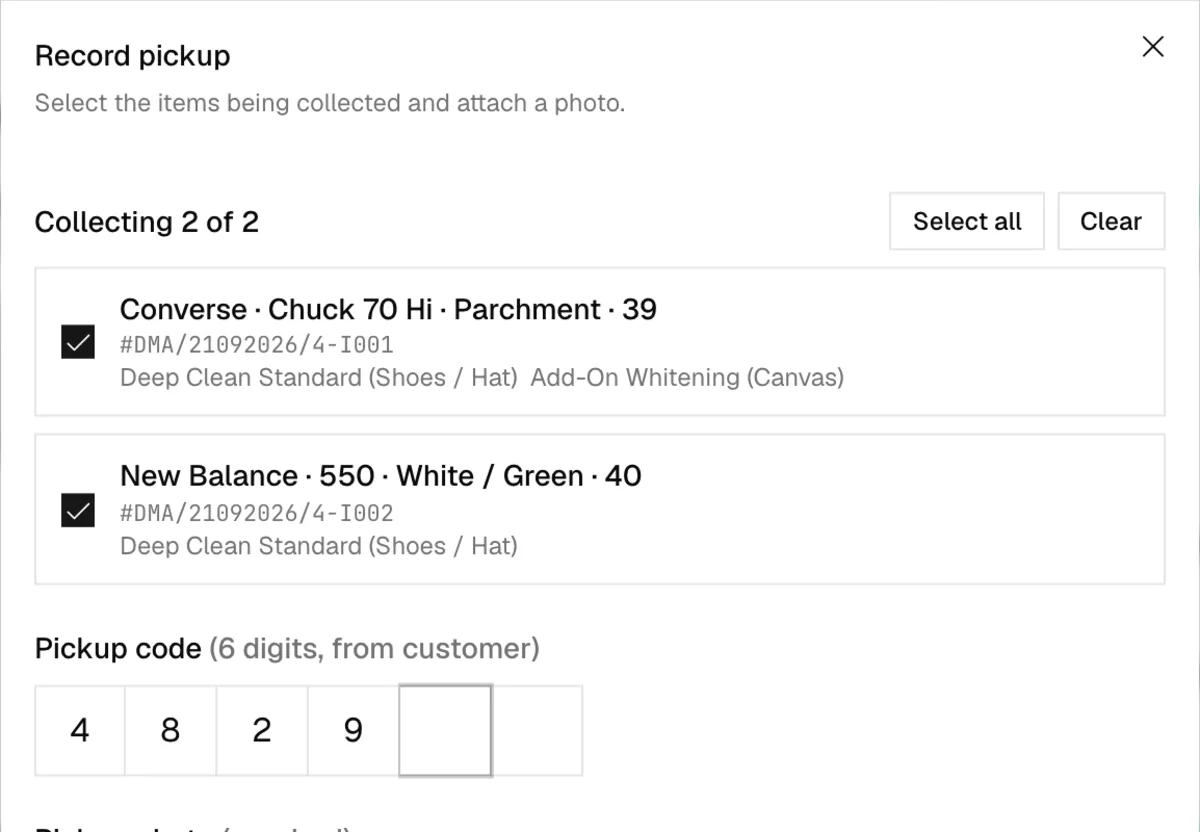
All of it is saved in one A group of database changes that either all happen or none do, so a failure halfway leaves nothing half-written.. If two cashiers try to hand over the same pair at the same moment, the second one gets "Another cashier already processed one of the selected items. Refresh and try again."
Pickups are recorded per pair, so it's impossible to hand over half a shoe's treatments. A pair that was refunded while still on the rack can be collected too, since it's still the customer's. It just isn't ticked by default, because otherwise a customer collecting one pair could walk out with two unless the cashier read the small print.
Paper changes the rule
Before the printer, no staff screen ever showed the pickup code. Only the tracking page did, once a pair was ready, so cashiers couldn't peek. The receipt printer turned the paper into the claim ticket.
Printing the code on the receipt means whoever holds the receipt holds the code. I wrote down why that's fine. Anyone holding the receipt could already look the order up on the tracking page and see the code once the pair was ready. Printing it on the receipt adds convenience without handing the holder anything they couldn't already get. And it's how customers already expect a counter like ours to work: "Physical claim tickets are the established laundry-counter convention."
It does mean cashiers can now see the code from the moment an order is created, which the old rule was there to prevent. I accepted that. The pickup dialog still shows the customer's name to check against, and nothing leaves before it's paid. Only one request to the server returns the code, the one that builds the receipt. The request behind the order screen still leaves it out, so the code can't drift back onto the staff screens.
The tracking page
Customers reach the tracking page by scanning the QR code on their receipt, or through a link the staff send them on WhatsApp. It's the only part of the POS a customer ever sees, so it looks nothing like the staff screens: just the wordmark, one status card, and a big green button to message the store.
The card leads with one sentence, like "1 of 2 Items done. Collect them now with code 482917." Under it is a rail with four stages, Received, Cleaning, QC and Ready, and the rail follows the slowest pair in the order. Customers usually come once for everything, so one ready pair shouldn't make the whole order look ready.
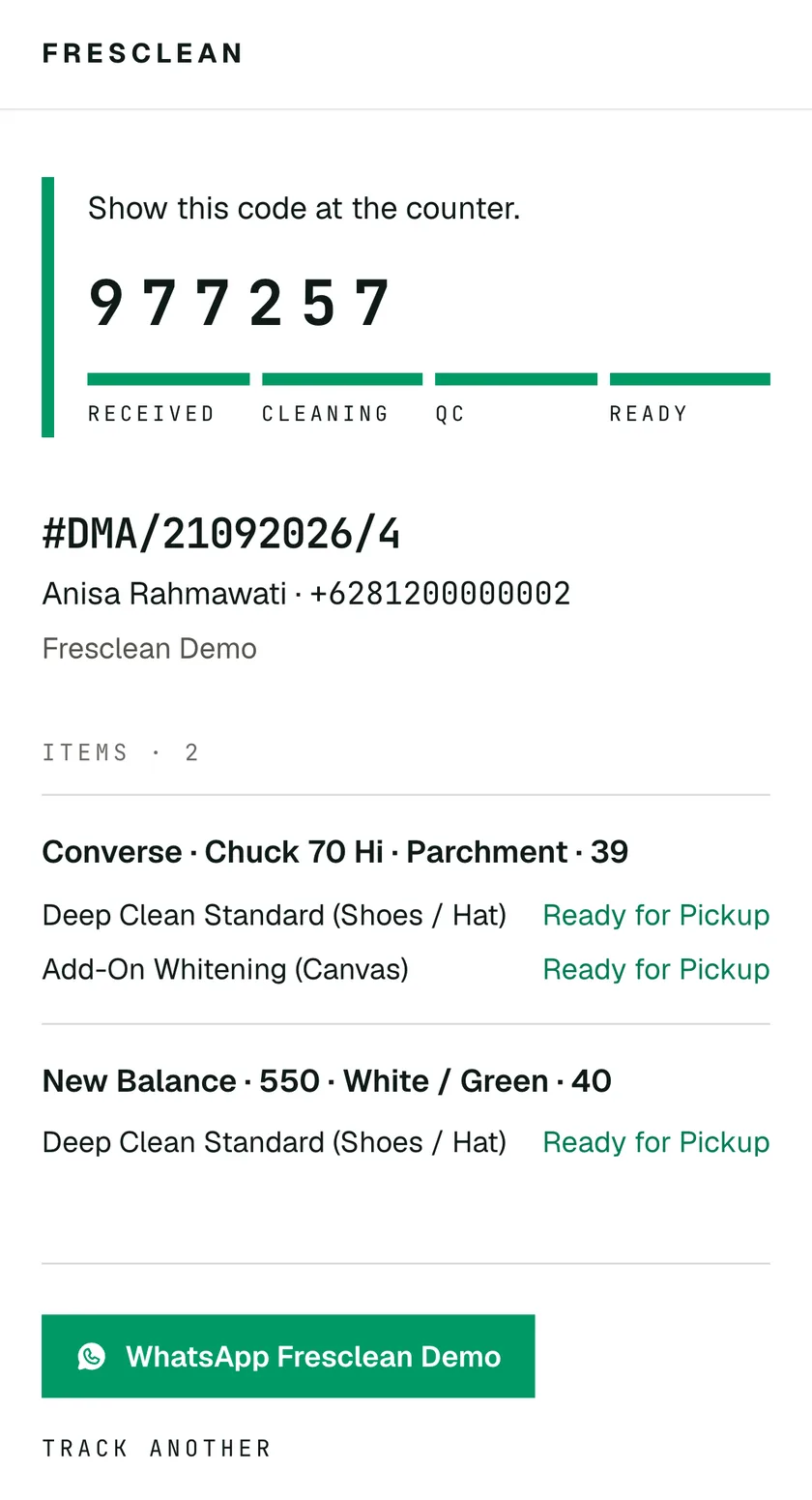
The code itself shows up once any pair can be collected. It used to wait for the whole order to be ready, and that had a nasty gap. A pair refunded before pickup made the order read "completed", since the money was settled, and the code disappeared for exactly the pair the customer was most likely to forget about.
Small things mattered here too:
- Customers type their phone number every way imaginable, so
08…,+62 812…and even+62 0812…all work. - A link opened straight from WhatsApp shows a placeholder card while it loads, instead of flashing the empty form first.
- The inputs are 16px on touch screens, so iOS stops zooming in when you tap them, which turned out to be part of a much bigger story about making the POS feel like an app.