La Élume Beauté · Chapter 4 of 7
Proving it's you
 Jovanus Hartono2026
On this page
The account screens are where you sign in with an email or a phone number, get back in when you've forgotten your password, and prove a new email or phone is yours before the store will use it. Codes go to your email or over WhatsApp, and every screen that asks for one uses the same six-box input. It's the least glamorous part of a store, and the part where small mistakes feel the most personal.
One field, two channels
Signing in and signing up accept either an email or an Indonesian phone number in the same field. The rule for telling them apart is simple. Anything with an "@" is an email. Anything else has to be a local number starting with 0, like 081234567890, and libphonenumber-js checks that it's a real one:
import { parsePhoneNumberFromString } from "libphonenumber-js";

const readIdentifier = (input: string) => {
  const value = input.trim();
  if (value.includes("@")) {
    return { channel: "email", email: value.toLowerCase() };
  }

  const looksLocal = /^0\d{8,12}$/.test(value); // 0, then 8 to 12 digits
  const isReal = parsePhoneNumberFromString(value, "ID")?.isValid() ?? false;
  return looksLocal && isReal ? { channel: "phone", phone: value } : null;
};
People who sign up with a phone get their code over WhatsApp instead of email.
The header that wouldn't sign out
One bug made signing out look broken. The header kept showing your name and cart count until something else happened to redraw it, and if the header still shows your name after you've signed out, you stop trusting the rest of the site too.
The cause was simple once I saw it. The A long random string the backend gives you when you sign in. Every request carries it to prove it's you. lives in localStorage, and writing to localStorage doesn't React running a component again to draw its latest state on the screen. anything. The header read the token on every render, but nothing ever told it to render again.
The fix was to make the token observable. The token helpers now fire a custom event whenever they save or clear it, and a hook reads it through React's useSyncExternalStore, which is built for exactly this: reading a value that lives outside React, and re-rendering whenever it says it changed.
const TOKEN_CHANGED = "token-changed";

export const clearToken = () => {
  localStorage.removeItem("token");
  window.dispatchEvent(new Event(TOKEN_CHANGED)); // tell this tab
};

const subscribe = (onChange: () => void) => {
  window.addEventListener(TOKEN_CHANGED, onChange);
  window.addEventListener("storage", onChange); // fires in other tabs
  return () => {
    window.removeEventListener(TOKEN_CHANGED, onChange);
    window.removeEventListener("storage", onChange);
  };
};

export const useToken = () =>
  useSyncExternalStore(subscribe, () => localStorage.getItem("token"));
Every component using that hook updates on the next render. The same hook listens to the browser's storage event, which only fires in other tabs, so signing out in one tab signs you out in all of them. Signing out also wipes everything the app had fetched and cached, so one shopper's data can't leak into the next session.
The fix didn't stick the first time. I took it out again, convinced that refreshing the fetched data on sign-out already redrew the header. I was wrong about that, and the fix went back in, unchanged, where it's stayed.
It pays off with expired sessions too. The one fetch function underneath every API call clears the token whenever the backend answers with a 401, and with the token observable, the header updates the moment that happens.
Forgot your password?
The forgotten password flow takes an email or a phone number too. An email gets you a "check your inbox" screen and a link. A phone number takes you to a screen where you type the code from WhatsApp and your new password together, and submit both at once. The new password is checked as you type: at least eight characters, an uppercase letter and a number, with each one ticking off as you meet it.
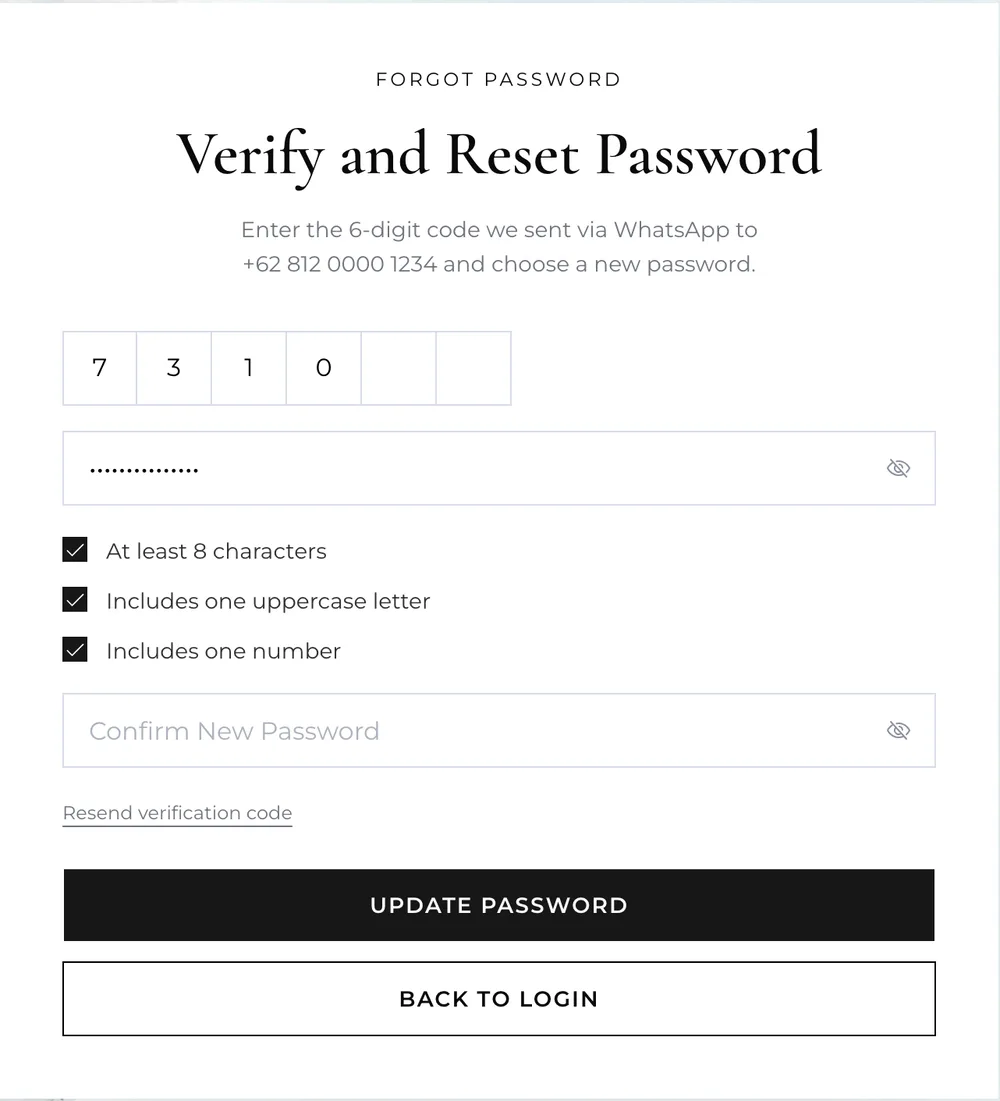
The phone number lives in the URL on that screen, as ?phone=081234567890, so reloading it keeps you on the same verification instead of throwing you back to the start.
Is that really your email?
Changing your email or phone number used to be a plain save. Now the store makes you prove the new one is yours. Saving sends a six-digit code to the new address or number, a dialog asks for it, and the change only sticks once the code checks out.
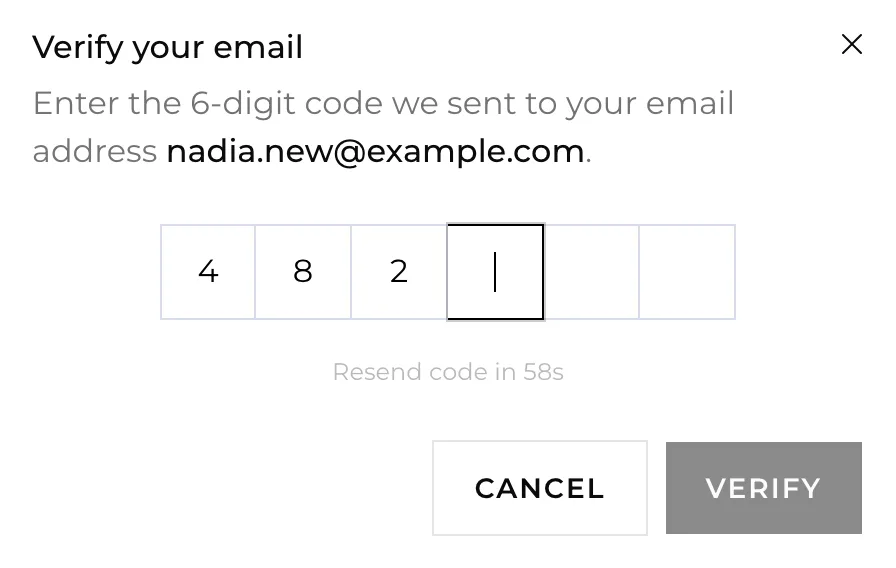
Only one of the two can change at a time. As soon as you start editing your email, the phone field locks with "Finish email verification before editing phone number.", and the other way round. That keeps each save to one new address and one code. I wrote the rule as: "Lock the non-edited field once one is dirty so each save targets a single channel," where dirty means edited.
The dialog has a 60-second wait before you can ask for another code, and the toast tells you where the new one went, "resent to your email" or "resent via WhatsApp".
Reloading was the interesting part. A code can take a moment to arrive, and it's easy to reload or wander off in the meantime. So the pending verification, which channel and which new value, is saved to sessionStorage, and a reload opens the same dialog for the same destination:
// When the code is sent
sessionStorage.setItem(
  "pending-verification",
  JSON.stringify({ channel: "email", value: "new@example.com" })
);

// When the profile page loads
const saved = sessionStorage.getItem("pending-verification");
if (saved) {
  openVerifyDialog(JSON.parse(saved)); // same dialog, same destination
}
sessionStorage is kept per tab, so a new tab starts clean. The code you'd half typed and the countdown aren't kept, and closing the dialog clears the saved state.
Six boxes
All of these screens use the same code input: six boxes that fill in as you type, built on input-otp. It accepts a pasted code, and it's marked with autocomplete="one-time-code", so a phone can offer the code when it recognises one in a new message. It came in with the email and phone checks, and sign-up and the password reset switched to it at the same time, so every screen that asks for a code works the same way.